Housekeeping Team Quick Start

HOUSEKEEPING

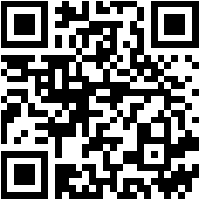
Download the App

iOS QR
iOS
Scan to download PropertyPlex Or search "PropertyPlex" on the App Store or Google Play.
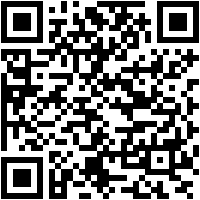
Android QR
Android

Log In

  1. Open the app and enter your Company Code
  2. Enter your email and password
  3. You'll land on the Housekeeping Dashboard with room cards

Your Login Details

A temporary password has been created for you. You're welcome to keep it or change it anytime from your account settings.

Room Status Guide

Clean Dirty Inspection Occupied Maintenance Out of Order
  1. Dirty — Room needs cleaning
  2. Clean — Room is ready for guests
  3. Inspection — Awaiting manager approval

Daily Workflow

  1. Check counters at the top for room status overview
  2. Tap a Dirty room to start cleaning
  3. After cleaning, tap the status and mark Clean (or Inspection if required)
  4. Use Service Request for guest requests (towels, minibar, etc.)
  5. Use Report Issue for maintenance problems (broken AC, leak, etc.)

Service Requests

  1. Tap a room card, then Service Request
  2. Select the service type (towels, minibar, turndown, etc.)
  3. The request appears in the Services tab
  4. Claim and complete service requests as you fulfill them

Reporting Issues

  1. Tap a room card, then Report Issue
  2. Enter a title, select issue type, set priority
  3. Add photos of the problem (optional)
  4. The issue goes to the maintenance team automatically
Tip: The app works offline. If you lose signal, keep working — changes sync automatically when you reconnect. The app also translates work orders to your language.