Portal Access & Login Links
All the dashboards and portals available to your team, with direct login links.
How Login Works
PropertyPlex uses a company code to identify your organization. Your company code is the short name (slug) you chose at signup — for example, tpb-resorts.
- The mobile app and web app require your company code + email + password
- The web dashboards below each have their own login page — use the same email and password as the mobile app
- The Organization Admin portal uses a separate login (provisioned by your platform administrator)
Your Company Code
Your company code is assigned when your account is created. You'll need it to log in from the mobile app and web app. You can find it in the System Admin portal under Settings, or ask your administrator.
Tip
Bookmark your dashboards for quick access. Each portal remembers your session so you won't need to log in every time.
Web Dashboards
Each dashboard is a standalone web app accessible from any browser.
System Admin
AdminFull property management: settings, team members, properties, rooms, billing, and integrations. This is the main administration hub for your location.
Who uses this: Property administrators and managers
Maintenance Dashboard
OperationsWork orders, preventive maintenance schedules, asset tracking, and technician assignments. View active tasks, priorities, and completion status.
Who uses this: Maintenance managers and technicians
Housekeeping Dashboard
OperationsRoom board with real-time status, turnover workflow, daily housekeeping reports, and room assignment management.
Who uses this: Housekeeping supervisors and staff
Reports Dashboard
AnalyticsAnalytics dashboards, performance metrics, work order trends, occupancy data, and exportable reports.
Who uses this: Managers and administrators
Organization Admin
Pro / EnterpriseMulti-location management for Professional and Enterprise plans. Create and manage locations (tenants), provision admin users for each location, and view organization-wide usage and billing.
Who uses this: Organization administrators managing multiple properties/locations
Separate Login
The Organization Admin portal uses a separate account from your regular user login. Your organization admin credentials are provisioned when you sign up for a Professional or Enterprise plan, or by your platform administrator.
Mobile Apps
The PropertyPlex mobile app is available for Android and iOS. It provides full access to work orders, properties, room status, and team management on the go.
PropertyPlex Mobile App
iOS & AndroidDownload the app, enter your company code, then log in with your email and password.
| Platform | Download |
|---|---|
| iOS | Download on the App Store |
| Android | Available on Google Play |
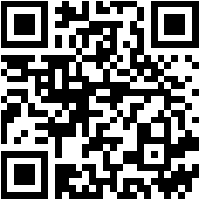
iOS (App Store)
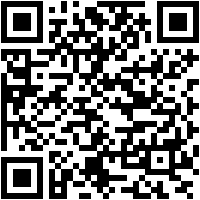
Android (Google Play)
Quick Reference
Summary of all portals and who should use each one.
| Portal | URL Path | Who | Login |
|---|---|---|---|
| System Admin | /system-admin |
Admins, Managers | Email + Password |
| Maintenance | /maintenance |
Maintenance team | Email + Password |
| Housekeeping | /hospitality |
Housekeeping team | Email + Password |
| Reports | /reports |
Managers, Admins | Email + Password |
| Organization Admin | /tenant-admin |
Org administrators | Org Admin credentials |
| Mobile App (iOS) | App Store | All team members | Company Code + Email + Password |
| Mobile App (Android) | Google Play | All team members | Company Code + Email + Password |
Troubleshooting
Common Issues
- "Company code not found" — Double-check the slug with your administrator. It's case-sensitive and uses hyphens (e.g.,
tpb-resorts). - "Invalid credentials" — Make sure you're using the correct portal. Organization Admin has separate credentials from the regular dashboards.
- Can't access Organization Admin — This portal is only available on Professional and Enterprise plans. Contact your platform administrator to upgrade or provision access.
- Forgot password — Use the "Forgot Password" link on the login page, or ask your administrator to reset it from the System Admin portal.