Legal entity: Kevin Ouellette, sole proprietor, doing business as prprtyplex.com
Program Name: prprtyplex.com Maintenance Notifications
Mobile app: PropertyPlex (Apple App Store and Google Play)
About the names used on this page. This SMS program is operated by Kevin Ouellette, sole proprietor, doing business as prprtyplex.com. The mobile application used to opt in is published on the Apple App Store and Google Play under the name PropertyPlex, and appears as "PropertyPlex" in your device settings. On this page, "prprtyplex.com" refers to the service and website, and "PropertyPlex" refers to the mobile app. They are the same business.
Effective Date: August 2026
prprtyplex.com provides an optional SMS text messaging program for work order notifications. This page describes the SMS program, how you opt in, and your rights.
We do not share, sell, or provide your mobile phone number or messaging consent data to third parties or affiliates for marketing or promotional purposes. No mobile information will be shared with third parties/affiliates for marketing/promotional purposes. Mobile opt-in data and consent will not be shared, sold, or rented to any third parties at any time.
What Messages Will I Receive?
If you opt in, you will receive SMS text messages from prprtyplex.com including:
New work order notifications
Work order assignments
Work order status changes (picked up, in progress, completed, waiting on parts)
Message frequency varies based on work order activity, typically 1-10 messages per day. Message and data rates may apply.
Daily parts reminders are delivered as in-app push notifications only and are not sent by SMS. No marketing, promotional, or advertising messages are ever sent through this program.
How Do I Opt In?
Consent is given directly to prprtyplex.com. When you opt in, you are giving consent to prprtyplex.com and to no one else. Your consent is not collected by, on behalf of, or shared with any third party or affiliate.
We do not share, sell, or provide your mobile phone number or messaging consent data to third parties or affiliates for marketing or promotional purposes. No mobile information will be shared with third parties/affiliates for marketing/promotional purposes. Mobile opt-in data and consent will not be shared, sold, or rented to any third parties at any time.
There is one way to opt in to SMS from prprtyplex.com: inside the PropertyPlex mobile app, after signing in. Opt-in is entirely optional. SMS is not required to use the prprtyplex.com service. Consent is not a condition of service.
Opt-In: PropertyPlex Mobile App
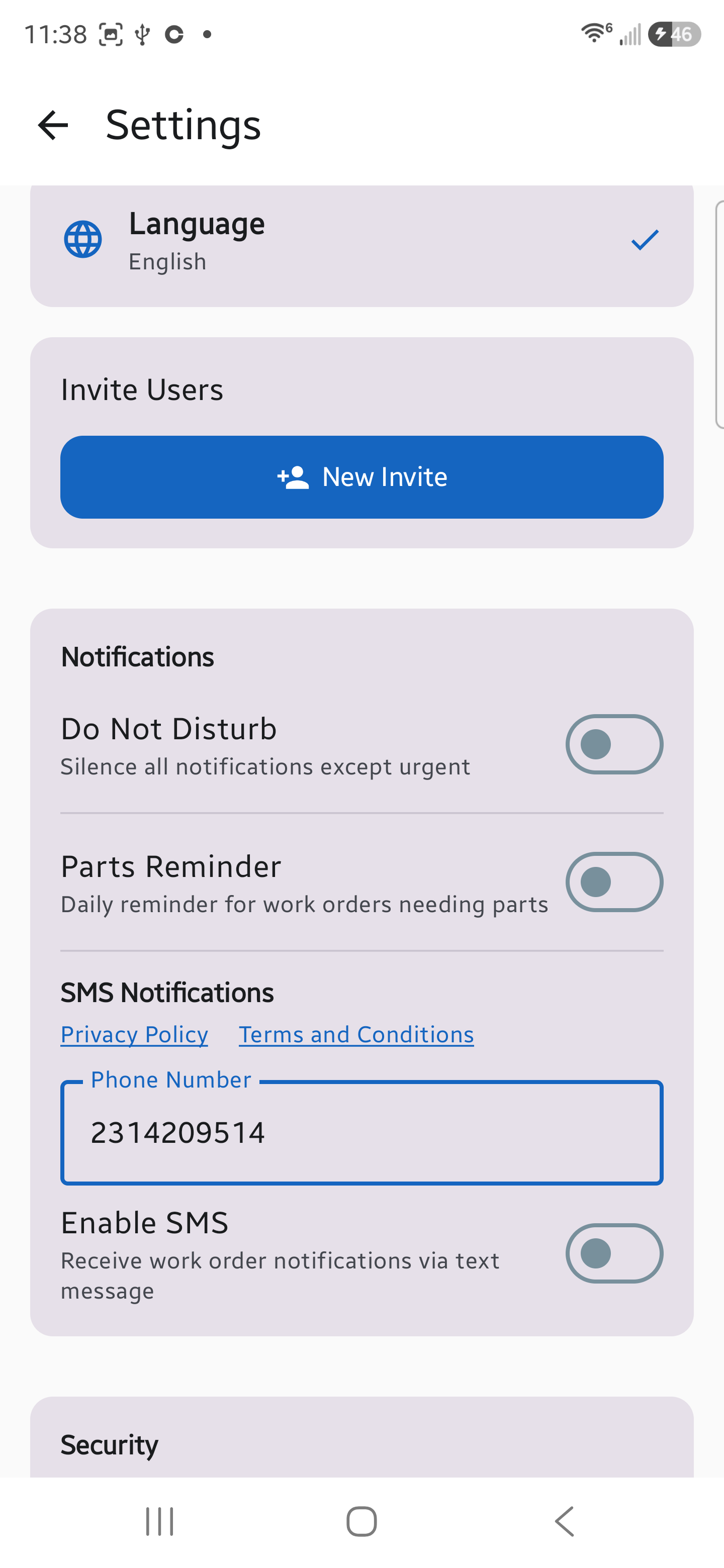
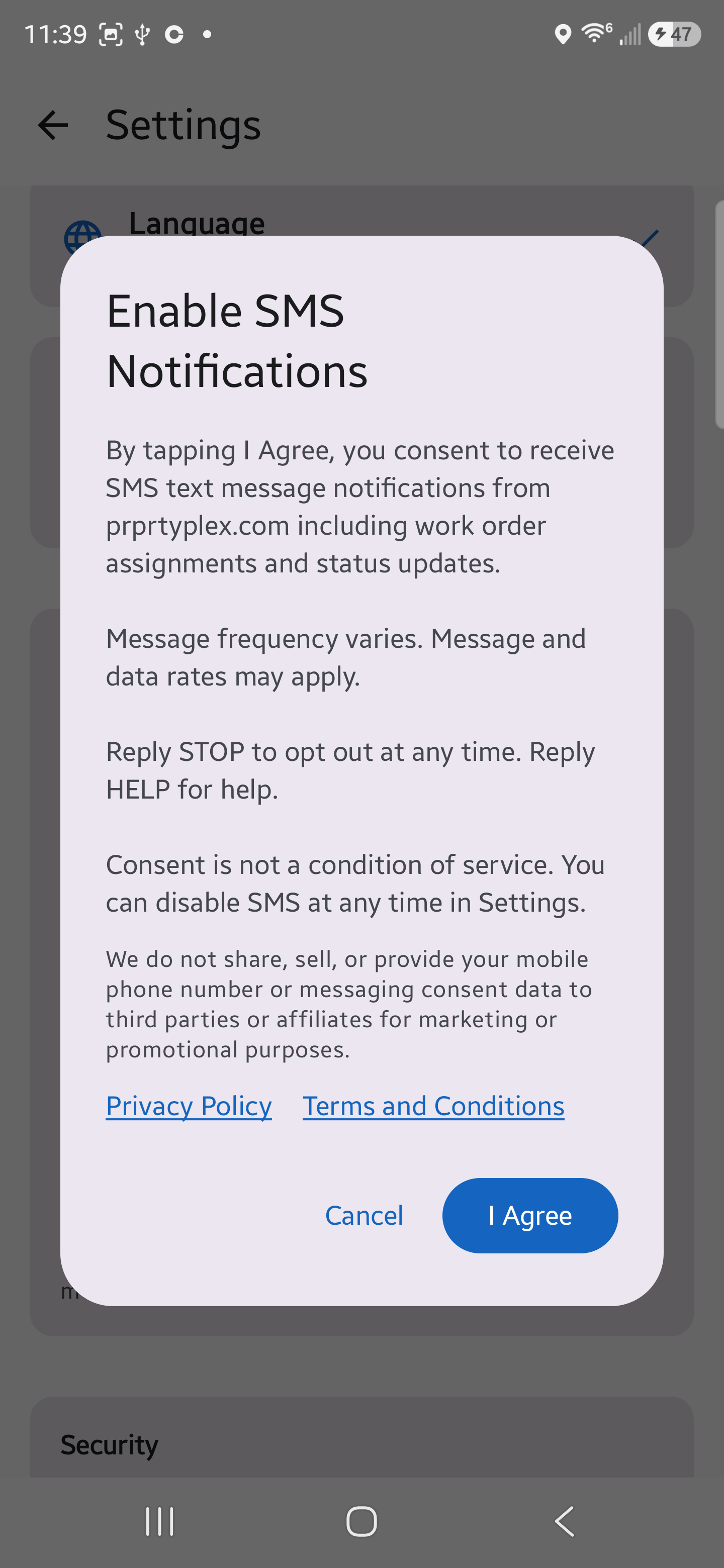
The user opens the PropertyPlex mobile app, signs in, and goes to Settings > Notifications > SMS Notifications. The "Enable SMS" toggle is off by default. The user enters their mobile phone number and taps the toggle, which opens a consent dialog titled "Enable SMS Notifications" containing the following text:
By tapping I Agree, you consent to receive SMS text message notifications from prprtyplex.com including work order assignments and status updates.
Message frequency varies. Message and data rates may apply.
Reply STOP to opt out at any time. Reply HELP for help.
Consent is not a condition of service. You can disable SMS at any time in Settings.
We do not share, sell, or provide your mobile phone number or messaging consent data to third parties or affiliates for marketing or promotional purposes.
The consent dialog also contains tappable Privacy Policy and Terms and Conditions links, which open prprtyplex.com/privacy and prprtyplex.com/terms. The same two links are shown in the SMS Notifications section itself, above the phone number field, before the user opts in.
The dialog has two buttons: Cancel and I Agree. SMS is only enabled if the user taps I Agree. Tapping Cancel closes the dialog and leaves SMS disabled. The phone number is stored and the user is opted in only after I Agree is tapped.
The opt-in flow works as follows:
Open the PropertyPlex app and sign in, then go to Settings
Scroll to the SMS Notifications section under Notifications
Enter your mobile phone number
Tap the "Enable SMS" toggle, which is off by default
Read the consent dialog and tap I Agree to consent, or Cancel to decline
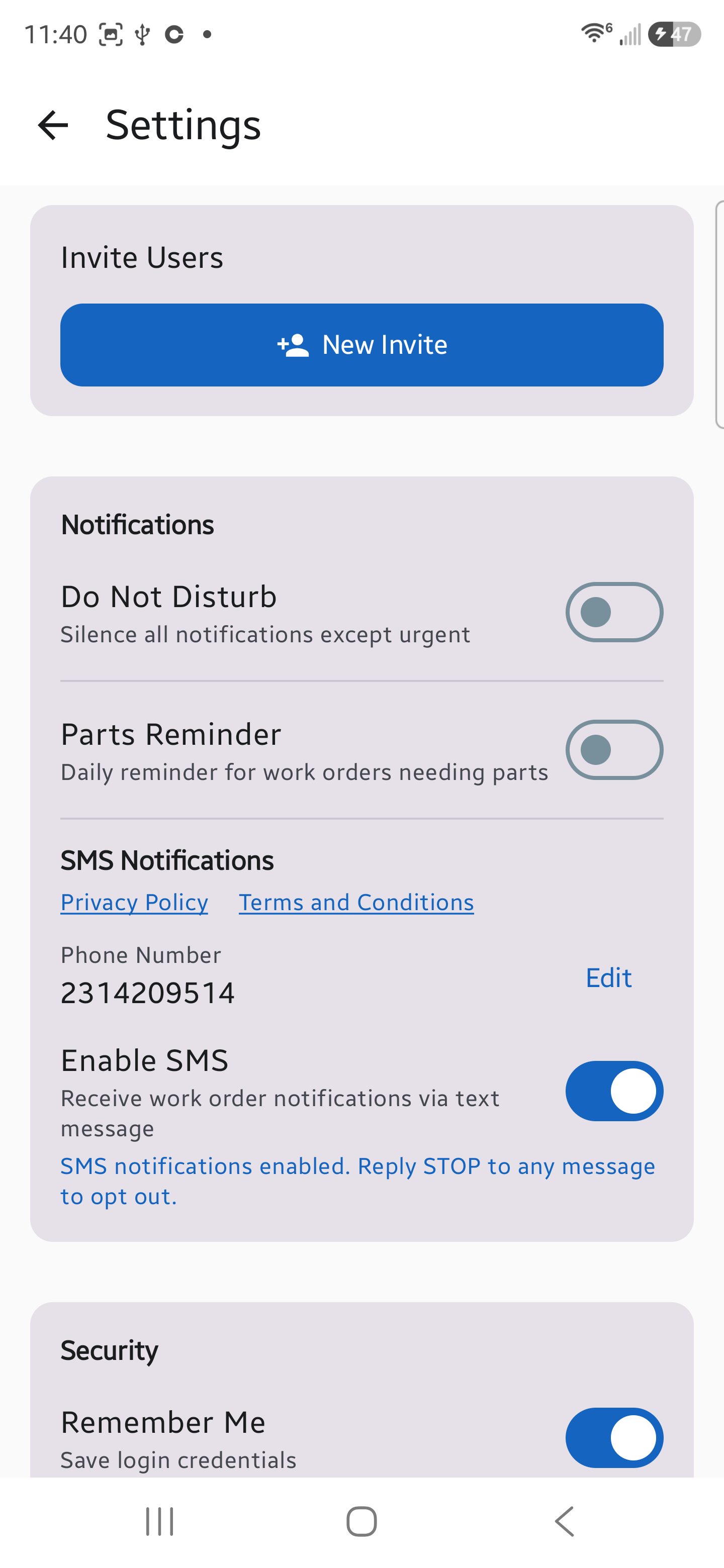
After tapping I Agree, your number is locked and the app displays: "SMS notifications enabled. Reply STOP to any message to opt out."
To change your number or disable SMS, tap Edit at any time. Tapping Edit immediately turns SMS off and clears the stored opt-in, so consent never carries over to a different number. Opting in again requires entering the new number and tapping I Agree in the consent dialog a second time.
Step 1: The Enable SMS toggle is OFF by default. Privacy Policy and Terms and Conditions links are shown in the SMS Notifications section before any opt-in. The user enters their own mobile number.
Step 2: The user taps the toggle. A consent dialog appears showing the full disclosure, the statement that mobile information is not shared with third parties or affiliates, tappable Privacy Policy and Terms and Conditions links, and Cancel / I Agree buttons. SMS stays off unless I Agree is tapped.
Step 3: After tapping I Agree, SMS is enabled and the number is locked with an Edit button. The app confirms: "SMS notifications enabled. Reply STOP to any message to opt out." Tapping Edit turns SMS back off and requires consenting again.
This is the only way to opt in. prprtyplex.com does not collect SMS consent through any website form, paper form, verbal agreement, or point-of-sale process, and does not purchase, rent, or import phone numbers or consent from any third party. Each user controls their own SMS opt-in. An administrator cannot opt a user in. SMS is entirely optional and not required to use the prprtyplex.com service. Consent is not a condition of service.
STOP, HELP, and START are supported on the prprtyplex.com number as standard subscriber-management keywords, as required by mobile carriers. START only restores messaging for an existing prprtyplex.com user who previously replied STOP. It cannot be used to enroll a new subscriber, and it is not advertised as a way to sign up.
How Do I Opt Out?
Reply STOP to any message at any time to stop receiving SMS notifications. After opting out, you will receive a confirmation message and no further SMS messages will be sent. You may also disable SMS Notifications in your PropertyPlex app settings at any time.
How Do I Get Help?
Reply HELP to any message for assistance. You can also contact us at support@prprtyplex.com.
Message Frequency
Message frequency varies based on work order activity. Typical frequency is 1-10 messages per day.
Message and Data Rates
Message and data rates may apply. There is no charge from prprtyplex.com for receiving SMS messages, but your mobile carrier's standard messaging rates apply.
Privacy
We do not share, sell, or provide your mobile phone number or messaging consent data to third parties or affiliates for marketing or promotional purposes. No mobile information will be shared with third parties/affiliates for marketing/promotional purposes. Mobile opt-in data and consent will not be shared, sold, or rented to any third parties at any time. For our full privacy policy, visit prprtyplex.com/privacy.